

Every customer request in one place, with a deadline and an owner
Every email, every chat message and every form request becomes a ticket with a history that everyone on the team can see. The system watches the deadlines, not a person with a list. We set it up around your process.
Every ticket visible and sorted by urgency
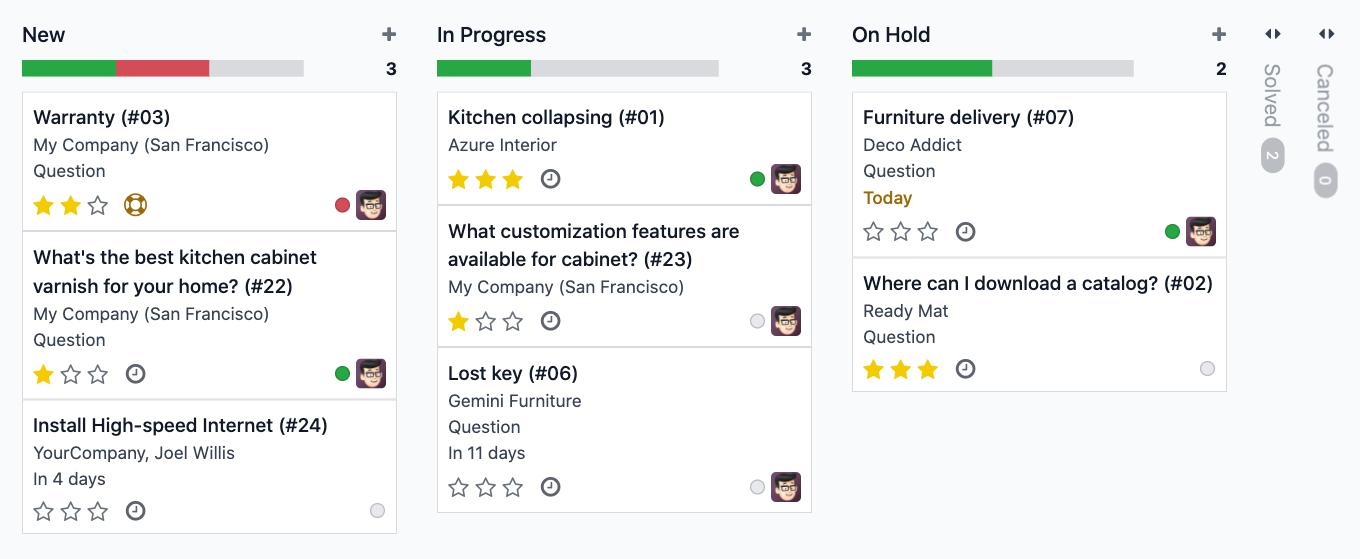
Every request lands in one place, sorted by urgency, with the team's workload next to it. Instead of searching the shared mailbox for what is overdue, the Kanban view shows what is due now and what can wait.
Everything customer support needs every day
Six areas where a properly set up customer support takes over the tracking, so your team can focus on the solution.
Every ticket under control
Follow, prioritize and resolve requests without losing track.
- ✓Kanban view. Tickets sorted by status, urgency or team, the way your process dictates.
- ✓Your own SLA rules. You set response and resolution times and see at a glance which tickets are running late.
- ✓Workload at a glance. You see how much is open with whom before you assign the next ticket.
- ✓Urgency shown with stars. Urgent cases stand out immediately, with no separate sorting step.
Reachable on every channel
However a customer gets in touch, it ends up in the same list.
- ✓Email becomes a ticket. Incoming emails turn into tickets without anyone forwarding anything.
- ✓Live chat. A chat window on your website that becomes a ticket as soon as the case needs follow-up.
- ✓Your own forms. You ask exactly what you need, and the ticket arrives complete.
- ✓One shared history. Whichever way the customer came in, the conversation stays in one place.
Customers handle some things themselves
Fewer follow-up questions for your team and more overview for the customer.
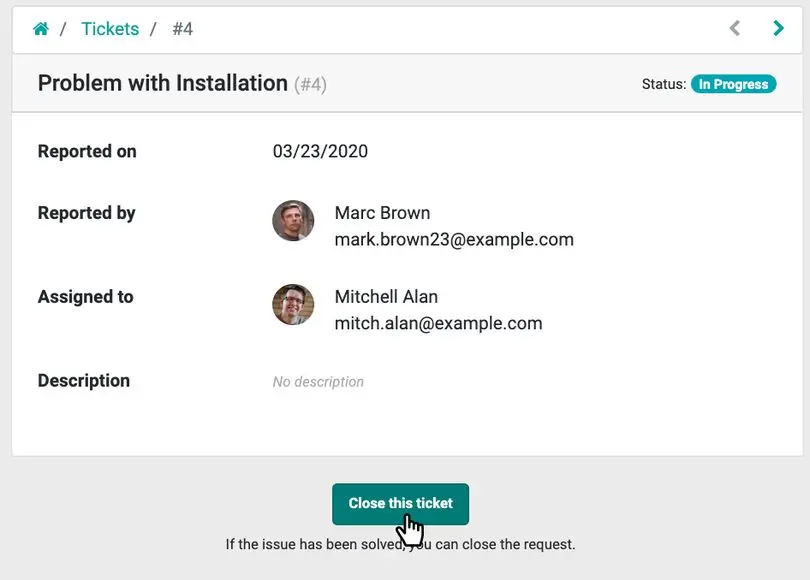
- ✓Customer portal. The customer sees the status, adds comments and closes their own ticket once it is done.
- ✓Fewer misunderstandings. A ticket the customer closes themselves counts as solved for them too.
- ✓More time for the hard cases. Your team deals with what really needs a person.
The system handles the routine
Deadlines, escalations and recurring answers run along, so your team can focus on the solution.
- ✓Deadlines keep running. The SLA clock starts when the ticket comes in, following the rules we define together.
- ✓Actions by rule. Emails or status changes fire at the points you define.
- ✓Pre-written answers. Text blocks for the questions that always come back, so answers get faster and more consistent.
- ✓Escalation without detours. A manager or a specialist team can be pulled in directly from the ticket.
You see how support is doing
Reports that are always current, instead of a list someone compiles before the weekly meeting.
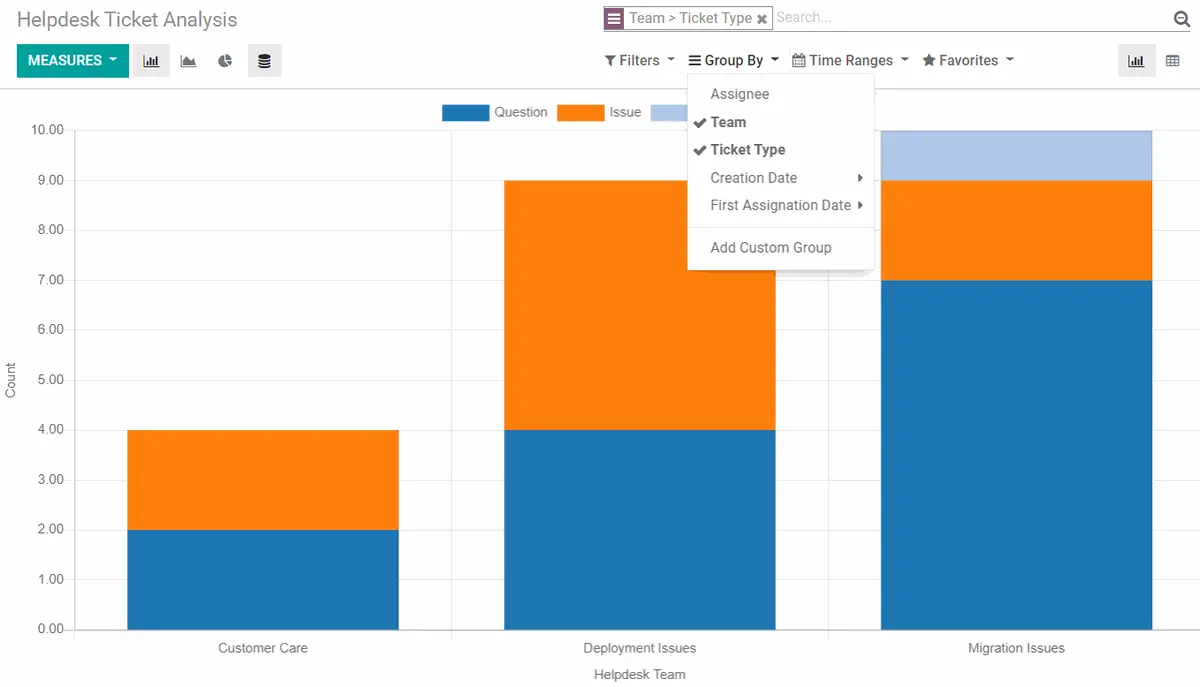
- ✓Analyze ticket volume. Break requests down by team, type or channel and spot patterns early.
- ✓SLA compliance. Response and resolution times visible continuously, not only at month end.
- ✓Your own reports. Grouped and filtered by what your team actually needs.
Everyone works from the same picture
Internal notes, shared lists and quick handover keep the team on the same page.
- ✓Internal notes. You discuss a ticket as a team without the customer reading along.
- ✓Shared lists. Whoever steps in for a colleague sees the complete history right away.
- ✓Handover to a specialist team. The case moves on with its full history, instead of as a forwarded email chain.
What an unsorted support desk actually costs
Nobody sets out to lose track of customer requests. It happens bit by bit, one unanswered reply after another, until the customer no longer believes anyone cares.
How many requests are open at your company right now?
If you cannot name the number straight away, that is already the answer. We look at one week of your inbox and show you what a ticket system would make of it.
Support that no longer consists of firefighting
The moments that decide whether a customer feels heard, solved the way real customer support works.
Deadlines that keep running
Deadlines and escalations run in the background, so nothing sits because somebody forgot to look at a list.
An inbox that sorts itself
Every channel leads into the same list, nobody has to check three places.
Customers who close tickets themselves
When customers close their own ticket, you save the follow-up question of whether it really fits.
Set up around your process
A ticket system only pays off once the deadlines and the escalation paths underneath are right. That is exactly what we are here for.
Matched to your deadlines
Response and resolution times, escalation rules and ticket types come from your process, not from a default setting.
Connected to sales and accounting
The customer's history sits next to their orders and invoices. Whoever handles the ticket sees the whole picture.
Moved over with your tickets
Open and closed tickets, customer data and notes come along, so your team does not start from zero.
Support from the people who set it up
When you ask, someone answers who knows your ticket types and your escalation paths. You do not have to explain your setup every time.
What your own SLA rule could look like
Every ticket gets an urgency on arrival, and from then on the clock runs in the system and not in one person's head. The example below shows deadlines you promise your own customers. They are not promises from us.
| Urgency | First response | Target resolution | Example |
|---|---|---|---|
| Critical | within 1 hour | same business day | An outage that affects all customers |
| High | within 4 hours | 1 business day | A paying customer cannot complete the order |
| Medium | within 1 business day | 2 to 3 business days | A function works, but not the way it should |
| Low | within 2 business days | with the next release | A small cosmetic issue or a general question |
Customer support questions that almost always come up
Let's build customer support that your customers notice
Book a no-obligation intro call. We look at how your customer support runs today and show you where the switch pays off.